
Category: Code

Python column provider for Gnome Files (Nautilus)

Below is an example of a python column provider for nautilus.
Identifying poor quality video files 480p, 720p \u2026 is difficult in nautilus at a glance.

You need to open the file properties to view the video metadata.
While there are a number of extensions out there for EXIF etc, i decided to implement my own.
Originally i tried to use MediaInfo, but it was far too slow. This is what i ended up with.

To activate it, just login and logout, or kill nautilus and restart it.

preview nautilus

Create target directory and file

mkdir -vp ~/.local/share/nautilus-python/extensions
touch ~/.local/share/nautilus-python/extensions/VideoMetaData.py

Install python libraries

pip install hachoir-metadata
pip install hachoir-parser
pip install hachoir-core

Add this to ~/.local/share/nautilus-python/extensions/VideoMetaData.py

#!/usr/bin/python

# dave@fio.ie

import os
import urllib
import logging
import re

import gi
gi.require_version('Nautilus', '3.0')
gi.require_version('Gtk', '3.0')

from gi.repository import Nautilus, GObject, Gtk, Gdk, GdkPixbuf
from hachoir_core.error import HachoirError
from hachoir_core.stream import InputIOStream
from hachoir_parser import guessParser
from hachoir_metadata import extractMetadata


class VideoMetadataExtension(GObject.GObject, Nautilus.ColumnProvider, Nautilus.MenuProvider, Nautilus.InfoProvider):

  def __init__(self):
    logging.basicConfig(filename='/tmp/VideoMetadataExtension.log',level=logging.DEBUG)
    pass


  def get_columns(self):
    return (
      Nautilus.Column(name="NautilusPython::video_width_columnn",attribute="video_width",label="Width",description="Video width"),
      Nautilus.Column(name="NautilusPython::video_height_columnn",attribute="video_height",label="Height",description="Video height"),
    )


  def update_file_info_full(self, provider, handle, closure, file_info):
  
    filename = urllib.unquote(file_info.get_uri()[7:]) 
    video_width = ''
    video_height = ''
    name_suggestion = ''

    file_info.add_string_attribute('video_width', video_width)
    file_info.add_string_attribute('video_height', video_height)
    file_info.add_string_attribute('name_suggestion', name_suggestion)  
  
    if file_info.get_uri_scheme() != 'file':
      logging.debug("Skipped: " + filename)
      return Nautilus.OperationResult.COMPLETE
      
    videomimes = [
      'video/x-msvideo',
      'video/mpeg',
      'video/x-ms-wmv',
      'video/mp4',
      'video/x-flv',
      'video/x-matroska'
    ]
    
    for mime in videomimes:
      if file_info.is_mime_type(mime):
        GObject.idle_add(self.get_video_metadata, provider, handle, closure, file_info)
        logging.debug("in Progress: " + filename)
        return Nautilus.OperationResult.IN_PROGRESS
         
    logging.debug("Skipped: " + filename)
    
    return Nautilus.OperationResult.COMPLETE


  def get_video_metadata(self, provider, handle, closure, file_info):
  
    video_width = ''
    video_height = ''
    name_suggestion = ''
  
    filename = urllib.unquote(file_info.get_uri()[7:])  
    filelike = open(filename, "rw+")
    
    try:
      filelike.seek(0)
    except (AttributeError, IOError):
      logging.debug("Unabled to read: " + filename)
      Nautilus.info_provider_update_complete_invoke(closure, provider, handle, Nautilus.OperationResult.FAILED)
      return False

    stream = InputIOStream(filelike, None, tags=[])
    parser = guessParser(stream)

    if not parser:
      logging.debug("Unabled to determine parser: " + filename)
      Nautilus.info_provider_update_complete_invoke(closure, provider, handle, Nautilus.OperationResult.FAILED)
      return False

    try:
      metadata = extractMetadata(parser)
    except HachoirError:
      logging.debug("Unabled to extract metadata: " + filename)
      Nautilus.info_provider_update_complete_invoke(closure, provider, handle, Nautilus.OperationResult.FAILED)
      return False
          
    if metadata is None:
      logging.debug("Metadata None: " + filename)
      Nautilus.info_provider_update_complete_invoke(closure, provider, handle, Nautilus.OperationResult.FAILED)
      return False

    matchObj = re.search( r'Image width: (.*?) pixels', str(metadata), re.M|re.I)

    if matchObj:
       video_width = matchObj.group(1)
        
    matchObj = re.search( r'Image height: (.*?) pixels', str(metadata), re.M|re.I)

    if matchObj:
       video_height = matchObj.group(1)

    file_info.add_string_attribute('video_width', video_width)
    file_info.add_string_attribute('video_height', video_height)
    file_info.add_string_attribute('name_suggestion', name_suggestion)   
    
    logging.debug("Completed: " + filename)
    
    file_info.invalidate_extension_info()
    
    Nautilus.info_provider_update_complete_invoke(closure, provider, handle, Nautilus.OperationResult.COMPLETE)
    
    return False
Namecheap DDNS Updates via DD-WRT

DD-WRT has limit support for different DDNS update mechanisms.
A simple workaround is the following script.

Login to your router and go to Administration > Commands

Add the following to the startup script, modifying it for your details

cat <<EOF > /tmp/namecheap.sh
KEY="YOUR NAME CHEAP DIRTY LONG KEY"
DDNS_DOMAIN="feeditout.com"
DDNS_HOST="dave-pc"
IP=\$(curl ifconfig.co)

curl -s -o temp.html "http://dynamicdns.park-your-domain.com/update?domain=\$DDNS_DOMAIN&password=\$KEY&host=\$DDNS_HOST&ip=\$IP"
EOF

chmod +x /tmp/namecheap.sh
/tmp/namecheap.sh

Finally, go to the Administration > Management and add a crontab to update it hourly.

0 */1 * * * /tmp/namecheap.sh

Enjoy \ud83d\ude09


Golang script to pull bandwidth usage from digiweb

I wrote the following script to pull broadband usage form digiweb.

Its fairly hilarious that digiweb are so badly organized.
They are still using smart telecom forums for customers to access pertinent data.
Furthermore the connection is http rather than https.

Here’s to passing un-encrypted passwords over the wire! 🙂

Digiweb figures are exactly 10% more that what DD-WRT reports. Interesting observation 😉

Enjoy 😉

package main

import (
    "fmt"
    "strconv"
    "net/http"
    "net/http/cookiejar"
    "crypto/tls"
    "io/ioutil"
    "crypto/md5"
    "encoding/hex"
    "net/url"
    "strings"
    "regexp"
)

var _smart_username = "username"
var _smart_password = "password"
var _modem_username = "0123456789"
var _modem_password = "password"
var _forum_endpoint = "http://support.smarttelecom.ie/forums/login.php?do=login"
var _usage_endpoint = "http://support.smarttelecom.ie/forums/smart_usage"

func GetMD5Hash(text string) string {
    hasher := md5.New()
    hasher.Write([]byte(text))
    return hex.EncodeToString(hasher.Sum(nil))
}

func getusage() {
    tr := &http.Transport {
        TLSClientConfig: &tls.Config { InsecureSkipVerify: true },
    }
    
    cookieJar, _ := cookiejar.New(nil)

    client1 := &http.Client { Transport: tr, Jar: cookieJar }
    
    form1 := url.Values{}
    form1.Add( "vb_login_username", _smart_username )
    form1.Add( "vb_login_password", "" )
    form1.Add( "s", "" )
    form1.Add( "securitytoken", "guest" )
    form1.Add( "do", "login" )
    form1.Add( "vb_login_md5password", GetMD5Hash( _smart_password ) )
    form1.Add( "vb_login_md5password_utf", GetMD5Hash( _smart_password ) )
    
    //fmt.Printf("%s", GetMD5Hash(_smart_password))
    
    req1, err := http.NewRequest( "POST", _forum_endpoint, strings.NewReader(form1.Encode()) )
    req1.Header.Add( "Content-Type", "application/x-www-form-urlencoded" )
    
    resp1, err := client1.Do( req1 )
    defer resp1.Body.Close()

    if err != nil {
        fmt.Printf( "Error : %s", err)
    }

    if resp1.StatusCode != 200 {
        fmt.Printf( "Error code: %s", strconv.Itoa( resp1.StatusCode ) )
    }
    
            
    client2 := &http.Client { Transport: tr, Jar: cookieJar }
    
    form2 := url.Values{}
    form2.Add( "user", _modem_username )
    form2.Add( "pass", _modem_password )
    form2.Add( "submit", "SUBMIT" )
    
    req2, err := http.NewRequest( "POST", _usage_endpoint, strings.NewReader(form2.Encode()) )
    req2.Header.Add( "Content-Type", "application/x-www-form-urlencoded" )
    
    resp2, err := client2.Do( req2 )
    defer resp2.Body.Close()
    
    if err != nil {
        fmt.Printf( "Error : %s", err)
    }

    if resp1.StatusCode != 200 {
        fmt.Printf( "Error code: %s", strconv.Itoa( resp1.StatusCode ) )
    }    

    bodyBytes2, err := ioutil.ReadAll( resp2.Body )
    if err != nil {
        fmt.Printf( "Error : %s", err )
    }
    
    //fmt.Printf( "%s\n", bodyBytes2 )
    
    re := regexp.MustCompile( "(?s)<table width=800 border=\"0\" style=\"border-collapse:collapse;\" cellspacing=\"0\">(.*)</table>" )
    matches := re.FindAllString( string(bodyBytes2), -1 )
        
    for i := len( matches )-1; i >= 0; i-- {
        reinout := regexp.MustCompile( "(?s)<td>(.*?)</td>" )
        inout := reinout.FindAllString( matches[i] , -1 )
        
        //fmt.Printf( "%v\n", inout[0][4:len(inout[0])-5] )
        //fmt.Printf( "%v\n", inout[1][4:len(inout[1])-5] )
        //fmt.Printf( "%v\n", inout[2][4:len(inout[2])-5] )
        //fmt.Printf( "%v\n", inout[3][4:len(inout[3])-5] )
        //fmt.Printf( "%v\n", inout[4][4:len(inout[4])-5] )
        //fmt.Printf( "%v\n", inout[5][4:len(inout[5])-5] )
        //fmt.Printf( "%v\n", inout[6][4:len(inout[6])-5] )
        //fmt.Printf( "%v\n", inout[7][4:len(inout[7])-5] )
        //fmt.Printf( "%v\n", inout[8][4:len(inout[8])-5] )
        //fmt.Printf( "%v\n", inout[9][4:len(inout[9])-5] )
        //fmt.Printf( "%v\n", inout[10][4:len(inout[10])-5] )
        
        i := strings.Index(inout[11], "(") + 1
        fmt.Printf( "%v\n", inout[11][i:len(inout[11])-10] )       
        
    }
}


func main() {
    getusage()
}

Golang DD-WRT Bandwidth Usage with Conky

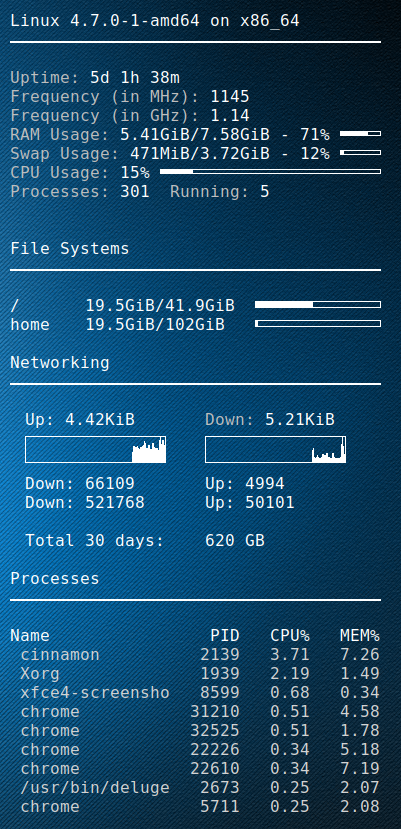
I setup a golang script to fetch the DD-WRT bandwidth usage for the previous 2 months, as well as the last 30 days(rolling).
Using conky then i can display it on my desktop.
My ISP (digiweb), don’t provide any means to check your bandwidth.
Picture at end of post 🙂

Golang DD-WRT script


package main

import (
    "fmt"
    "strconv"
    "net/http"
    "crypto/tls"
    "io/ioutil"
    "regexp"
    "time"
)

// You set these
var _ddwrt_ip = "10.1.1.1"
var _ddwrt_ssl = true
var _ddwrt_port = 443
var _ddwrt_user = "root"
var _ddwrt_pass = "password"

// don't set these
var _ddwrt_this_month = ""
var _ddwrt_last_month = ""

func printmonth(monthyear string) {
    tr := &http.Transport {
        TLSClientConfig: &tls.Config { InsecureSkipVerify: true },
    }

    client := &http.Client { Transport: tr }

    proto := "http"
    if _ddwrt_ssl == true {
      proto = "https"
    }

    req, err := http.NewRequest( "GET", proto + "://" + _ddwrt_ip + ":" + strconv.Itoa( _ddwrt_port ) + "/ttgraph.cgi?" + monthyear, nil )
    req.SetBasicAuth( _ddwrt_user, _ddwrt_pass )

    resp, err := client.Do( req )
    defer resp.Body.Close()

    if err != nil {
        fmt.Printf( "Error : %s", err)
    }

    if resp.StatusCode != 200 {
        fmt.Printf( "Error code: %s", strconv.Itoa( resp.StatusCode ) )
    }

    bodyBytes, err2 := ioutil.ReadAll( resp.Body )
    if err2 != nil {
        fmt.Printf( "Error : %s", err2 )
    }
    
    if len( _ddwrt_this_month ) == 0 {
        _ddwrt_this_month = string( bodyBytes )
    } else {
        _ddwrt_last_month = string( bodyBytes )
    }

    re := regexp.MustCompile( "(?s)<li id=\"label\">(.*?)</li>" )
    matches := re.FindAllString( string( bodyBytes ), -1 )

    rein := regexp.MustCompile( "(?s)Incoming: ([0-9]+)" )
    reinmatches := rein.FindStringSubmatch( matches[0] )

    reout := regexp.MustCompile( "(?s)Outgoing: ([0-9]+)" )
    reoutmatches := reout.FindStringSubmatch( matches[0] )

    fmt.Printf( "${goto 20}Down: %s ${goto 200}Up: %s\n", reinmatches[1], reoutmatches[1] )
}

func parse30days() {
    
    var all = _ddwrt_last_month + _ddwrt_this_month
    
    re := regexp.MustCompile( "(?s)onmouseover=\"Show(.*?)onmouseout" )
    matches := re.FindAllString( all, -1 )
    
    var down int64
    var up int64
    var total int64
    var days30 = 30
    
    for i := len( matches )-1; i >= 0; i-- {
        reinout := regexp.MustCompile( "(?s)Incoming: ([0-9]+) MB / Outgoing: ([0-9]+) MB" )
        inout := reinout.FindStringSubmatch( matches[i] )
        r, _ := strconv.ParseInt( inout[1], 10, 64 )
        
        if r == 0 {
            continue;
        }
        
        down = down + r
        
        t, _ := strconv.ParseInt( inout[2], 10, 64 )
        up = up + t
        
        days30--
        
        if days30 == 0 {
           break;
        }
    }

    
    total = down + up
    fmt.Printf( "\n${goto 20}Total 30 days:${goto 200}%d GB\n", total / 1024 )
}

func main() {
    now := time.Now()
    monthyear := now.Format("01-2006")
    printmonth(monthyear)
    monthyear = now.AddDate(0,-1,0).Format("01-2006")
    printmonth(monthyear)
    parse30days()
}

Conky script Integration


conky.config = {
    alignment = 'top_right',
    background = true,
    border_width = 1,
    cpu_avg_samples = 2,
	default_color = 'white',
    default_outline_color = 'white',
    default_shade_color = 'white',
    draw_borders = false,
    draw_graph_borders = true,
    draw_outline = false,
    draw_shades = false,
    use_xft = true,
    font = 'DejaVu Sans Mono:size=12',
    gap_x = 50,
    gap_y = 50,
    double_buffer = true,
    minimum_height = 5,
	minimum_width = 5,
    net_avg_samples = 2,
    no_buffers = true,
    out_to_console = false,
    out_to_stderr = false,
    extra_newline = false,
    own_window = true,
    own_window_class = 'Conky',
    own_window_type = 'desktop',
    own_window_transparent = true,
    stippled_borders = 0,
    update_interval = 3.0,
    uppercase = false,
    use_spacer = 'none',
    show_graph_scale = false,
    show_graph_range = false
}

conky.text = [[
$sysname $kernel on $machine
${hr 2}

${color grey}Uptime:$color $uptime
${color grey}Frequency (in MHz):$color $freq
${color grey}Frequency (in GHz):$color $freq_g
${color grey}RAM Usage:$color $mem/$memmax - $memperc% ${membar 4}
${color grey}Swap Usage:$color $swap/$swapmax - $swapperc% ${swapbar 4}
${color grey}CPU Usage:$color $cpu% ${cpubar 4}
${color grey}Processes:$color $processes  ${color grey}Running:$color $running_processes


${color}File Systems
${hr 2}

/${goto 80}$color${fs_used /}/${fs_size /} ${goto 250}${fs_bar 6 /}
/home${goto 80}$color${fs_used /}/${fs_size /home} ${goto 250}${fs_bar 6 /home}
 
${color}Networking
${hr 2}

${goto 20}Up:$color ${upspeed wlp3s0} ${goto 200}${color grey}Down:$color ${downspeed wlp3s0}
${goto 20}${upspeedgraph wlp3s0 26,140 FFFFFF FFFFFF}${goto 200}${downspeedgraph wlp3s0 26,140 FFFFFF FFFFFF}
${execpi 3600 /usr/bin/go run /home/dave/.conky/ddwrt-bandwidth.go}

${color}Processes
${hr 2}

Name                PID   CPU%   MEM%
${color lightgrey} ${top name 1} ${top pid 1} ${top cpu 1} ${top mem 1}
${color lightgrey} ${top name 2} ${top pid 2} ${top cpu 2} ${top mem 2}
${color lightgrey} ${top name 3} ${top pid 3} ${top cpu 3} ${top mem 3}
${color lightgrey} ${top name 4} ${top pid 4} ${top cpu 4} ${top mem 4}
${color lightgrey} ${top name 5} ${top pid 5} ${top cpu 5} ${top mem 5}
${color lightgrey} ${top name 6} ${top pid 6} ${top cpu 6} ${top mem 6}
${color lightgrey} ${top name 7} ${top pid 7} ${top cpu 7} ${top mem 7}
${color lightgrey} ${top name 8} ${top pid 8} ${top cpu 8} ${top mem 8}
${color lightgrey} ${top name 9} ${top pid 9} ${top cpu 9} ${top mem 9}

]]

Enjoy
rolling


Debian Sid Intel I217-V Not Working

After scouring for ages looking for this fix. I\u2019ve decided to document it.
It comes form a number of sources. Kudos to the individual people.

Problem
Rebooting from windows into Linux renders the NIC unusable. the classic \u201clights are on but no one is home\u201d
Some people advice disabling PXE etc in the bios. There is a better solution

Identify the NIC

root@dave-pc:/lib/systemd/system# lspci | grep Ether
00:19.0 Ethernet controller: Intel Corporation Ethernet Connection I217-V (rev 04)

Create a systemd oneshot service file

cat > /lib/systemd/system/intelnicreset.service <<EOT
[Unit]
Description=Reset Intel Nic on Boot before it comes up
Before=NetworkManager.service
Wants=NetworkManager.service

[Service]
Type=oneshot
ExecStart=/usr/bin/resetintelnic
RemainAfterExit=no

[Install]
WantedBy=multi-user.target
EOT

Reset NIC bash file

cat > /usr/bin/resetintelnic <<EOT
#!/bin/bash

#Get the PCI-Address of network card (Caution: This works ONLY with ONE NIC)
PCI=`/usr/bin/lspci | /bin/egrep -i 'network|ethernet' | /usr/bin/cut -d' ' -f1`
PCIPATH=`/usr/bin/find /sys -name *\${PCI} | /bin/egrep -i *pci0000*`
/usr/bin/logger -t "ResetNIC" "Resetting PCI NIC ${PCIPATH}"

#Reset the PCI Device completely (like Power-ON/Off)
echo 1 >${PCIPATH}/reset
EOT

Make it executable

chmod +x /usr/bin/resetintelnic